


Why Rune
-
Native
A Mac app, not a web page.
SwiftUI and AppKit, no browser inside. It opens in a blink, follows your accent colour and dark mode and feels like the rest of your Mac.
-
Your R
Runs the R you already have.
CRAN, Homebrew or a custom path. Your packages, your
.Rprofile, your renv. Rune adds a small kernel and stays out of the way. -
You decide
Agents that ask first.
Five AI agents read your session, but every line of code they want to run and every edit they propose waits for your OK.
Start screen
Everything R needs, in one calm window.
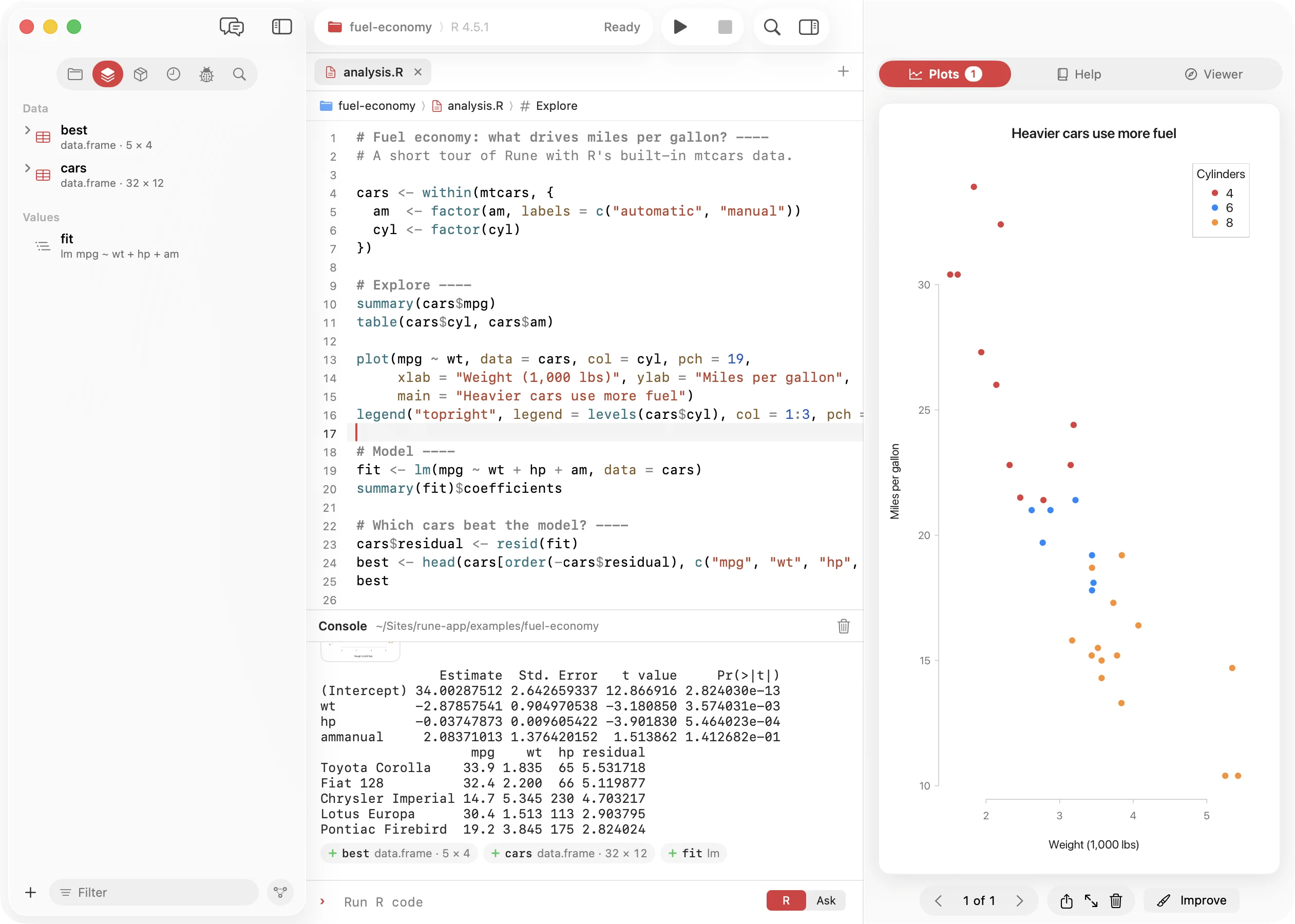
Files and workspace on the left, script and console in the middle, plots, help and the viewer on the right. The assistant takes the left column when you call it with ⌘0, and ⌘K finds any command, object, file or help page.
Level 1 · Editor and console
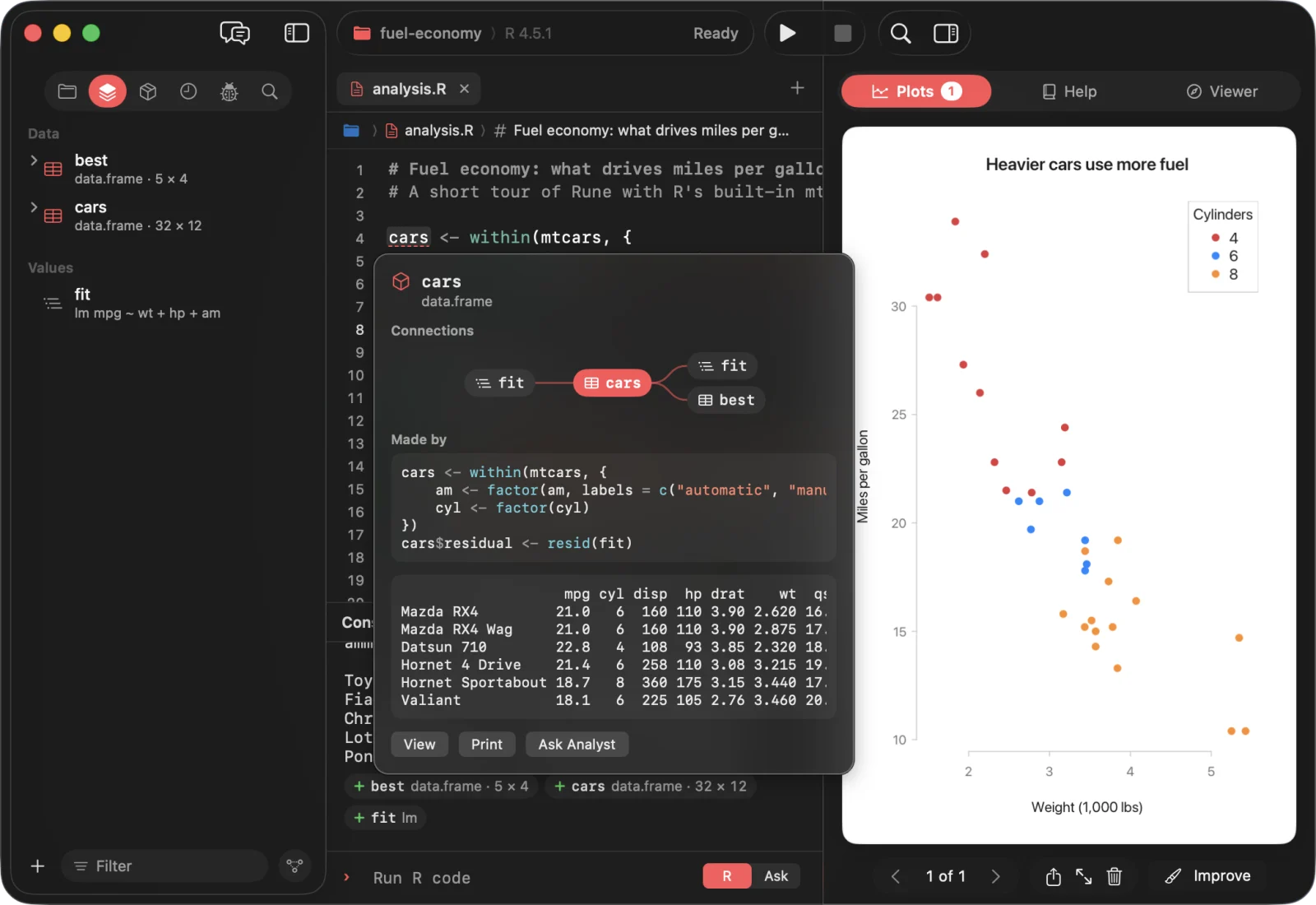
Point at anything. Rune knows what it is.
- Hover a data frame for where it came from, a column for its numbers and histogram, a function for its signature and help.
- Completion from the live session, signature hints, brackets, indentation and syntax errors as you type.
- Run a line, a section, a chunk, up to the cursor or the whole script. R Markdown and Quarto knit straight into the viewer.
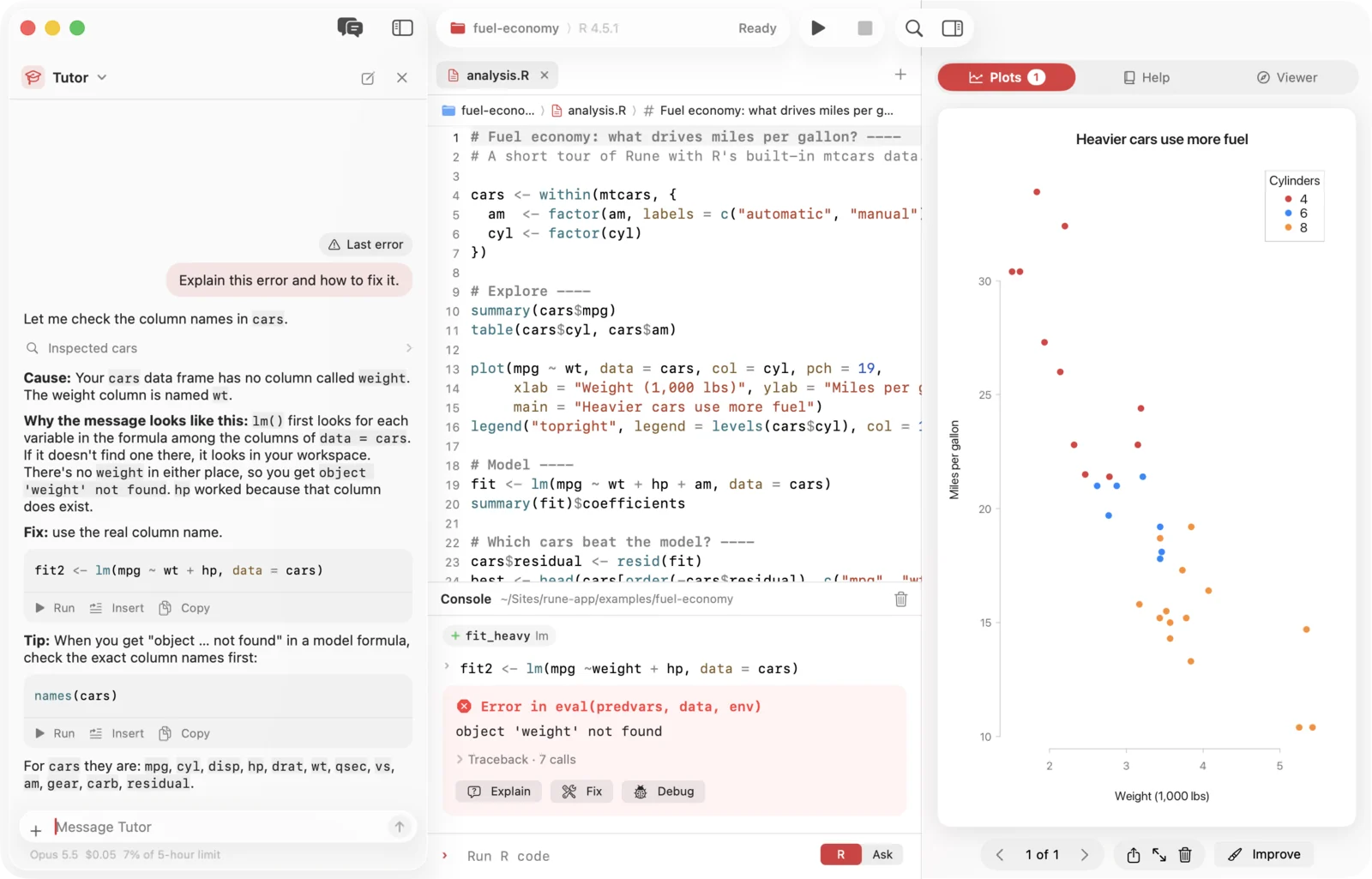
- Errors come with a folded traceback and three buttons: Explain, Fix and Debug.
Level 2 · Workspace and data
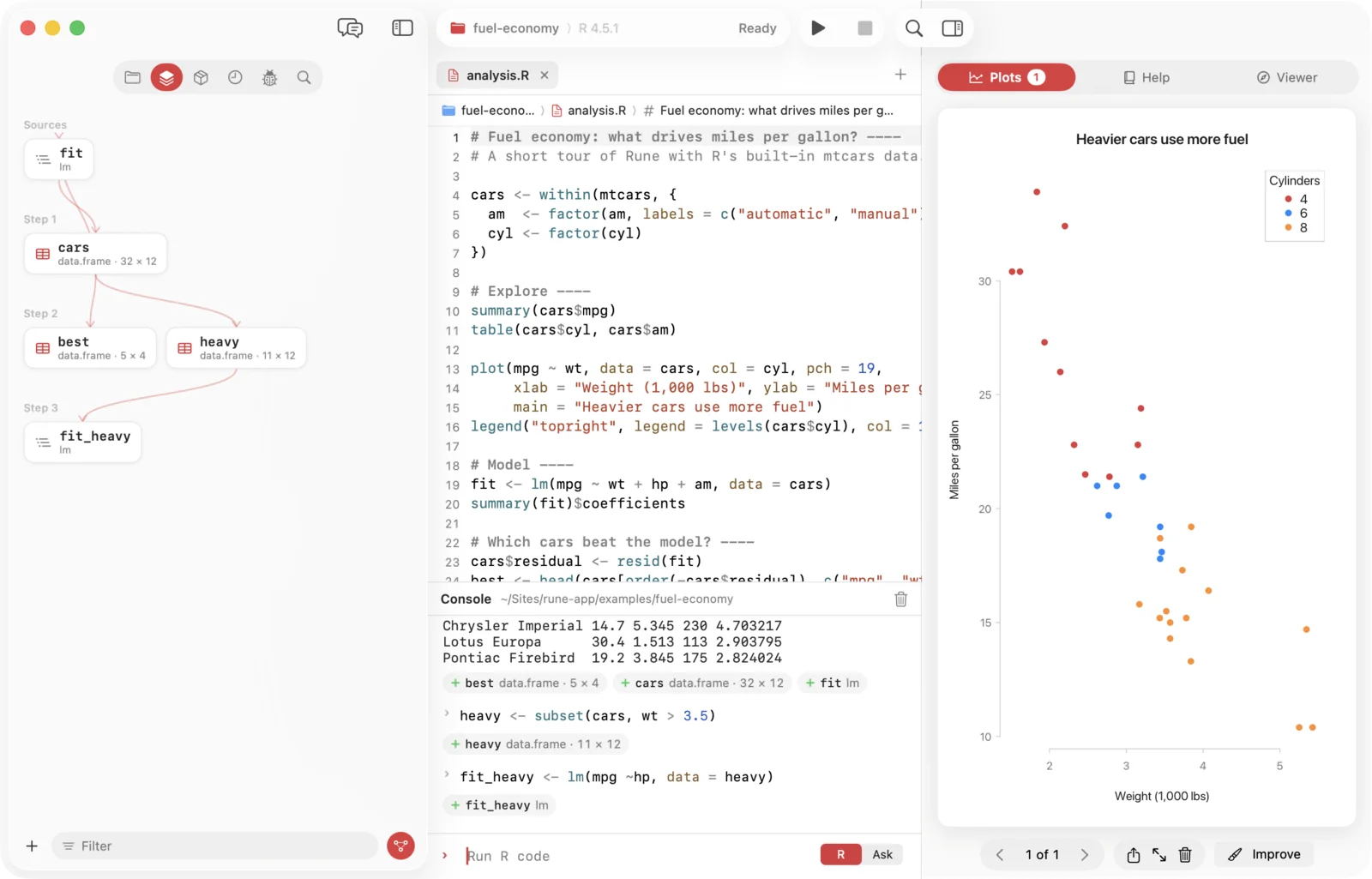
See what every run changed.
- Each console cell shows chips for what it did to your workspace. Click one to open the data.
- The workspace map draws which object was made from which, from sources to results.
- The data viewer pages through millions of rows, sorts, filters and copies, with a small chart in every column header.
- CSV, TSV, Excel, RDS and RData files open by importing them, with the code in the console.
Level 3 · Plots
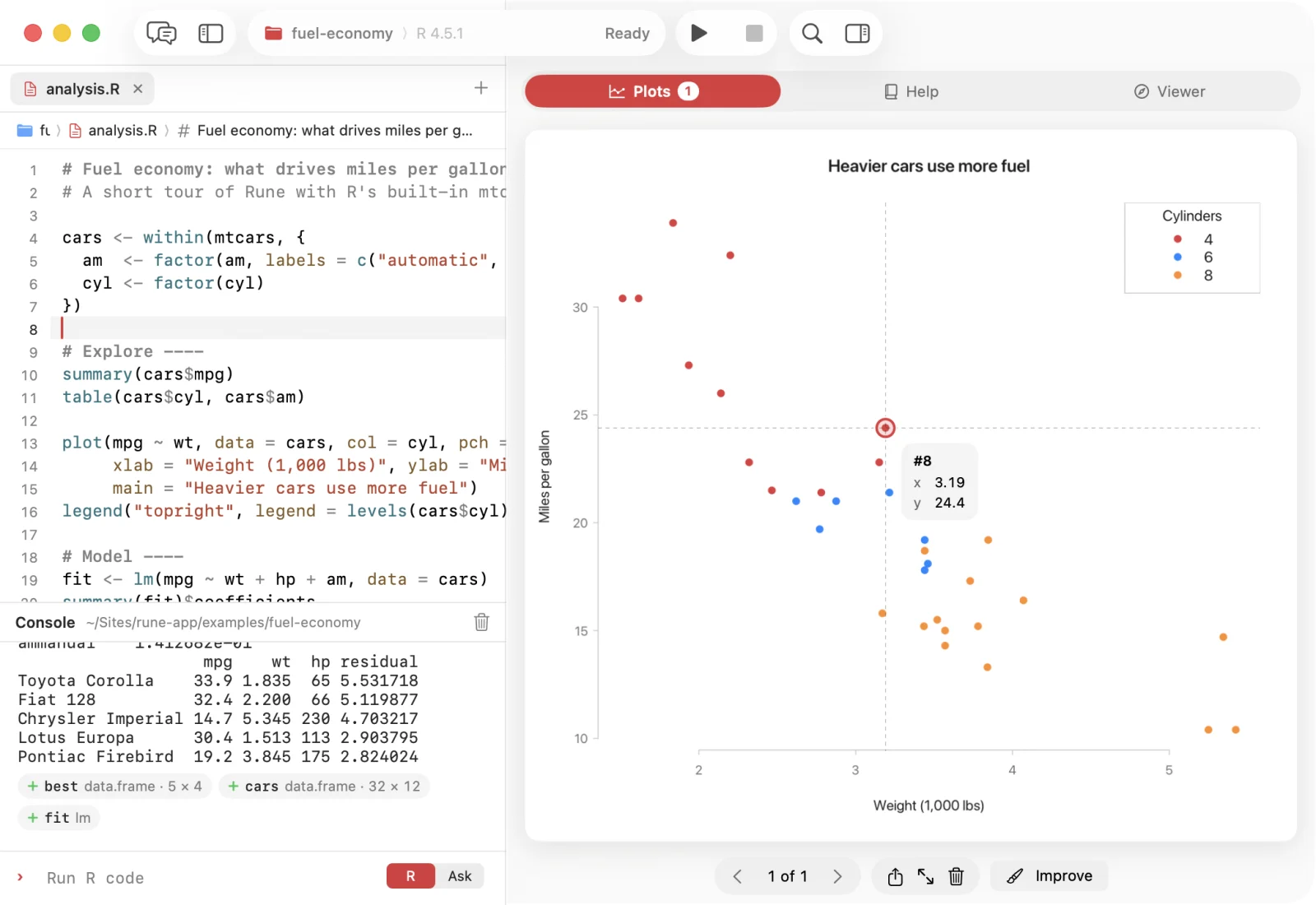
Plots that answer back.
- Charts pick up your system accent colour, in light and dark, or draw exactly like classic R.
- Point at a base R plot to read its values in data units, snap to the nearest point or light up a bar.
- Drag across it to zoom. R redraws exactly that range.
- Save as PNG, PDF or SVG at the size and resolution you choose, or drag the plot into any app.

Level 4 · Agents
Five agents on your team.
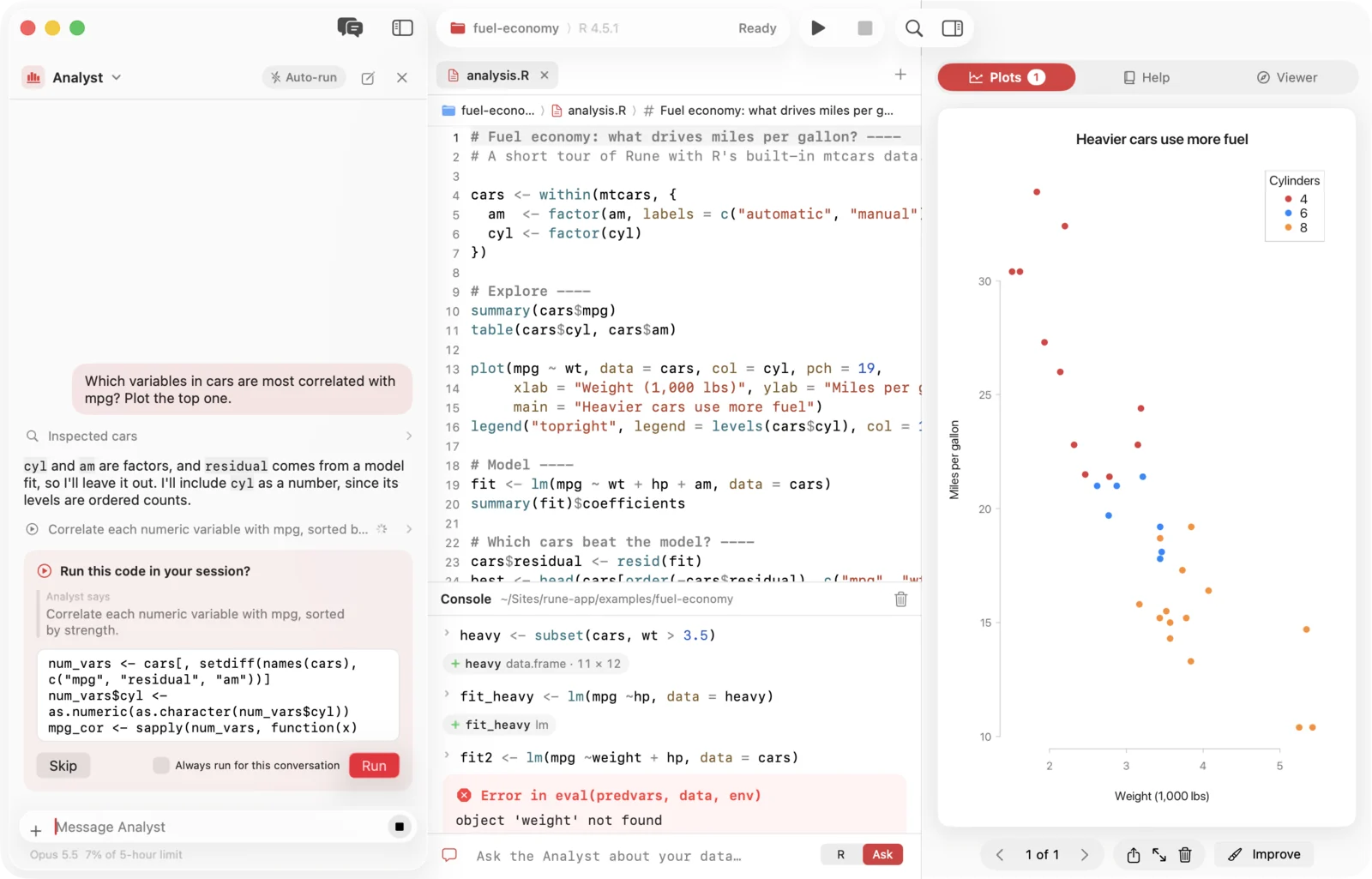
They run on the Claude Code CLI and reach your live session through Rune's own tools: they list objects, read data, look at plots and propose code. You stay the one who presses Run.
Your party
- 1AnalystExplores data and answers questions by running R, in small verified steps.
- 2TutorExplains errors, output and R concepts without touching your session.
- 3Plot DesignerTurns rough charts into clear, colour-blind-safe figures.
- 4ReviewerReads your script for bugs, reproducibility and clarity, by severity.
- 5ReporterWrites an R Markdown report from your session, never inventing results.
How a turn works
- LookThe agent reads what it needs: workspace, data rows, the script, the console, a plot. Reading never runs code.
- ProposeCode to run shows up as a card you can edit. Script edits appear tinted in the editor, one at a time.
- You decideRun or Skip, Accept or Discard. Package installs always ask, even with Auto-run on.
Pick the model and reasoning effort per agent, set a reply language and standing instructions, and see what each reply cost. Conversations are kept per project and pick up where you left off.
Call them from anywhere: ⌘I in the editor, Ask mode in the console, Explain on an error, Improve under a plot, Describe on a data frame.
Level 5 · Help and viewer
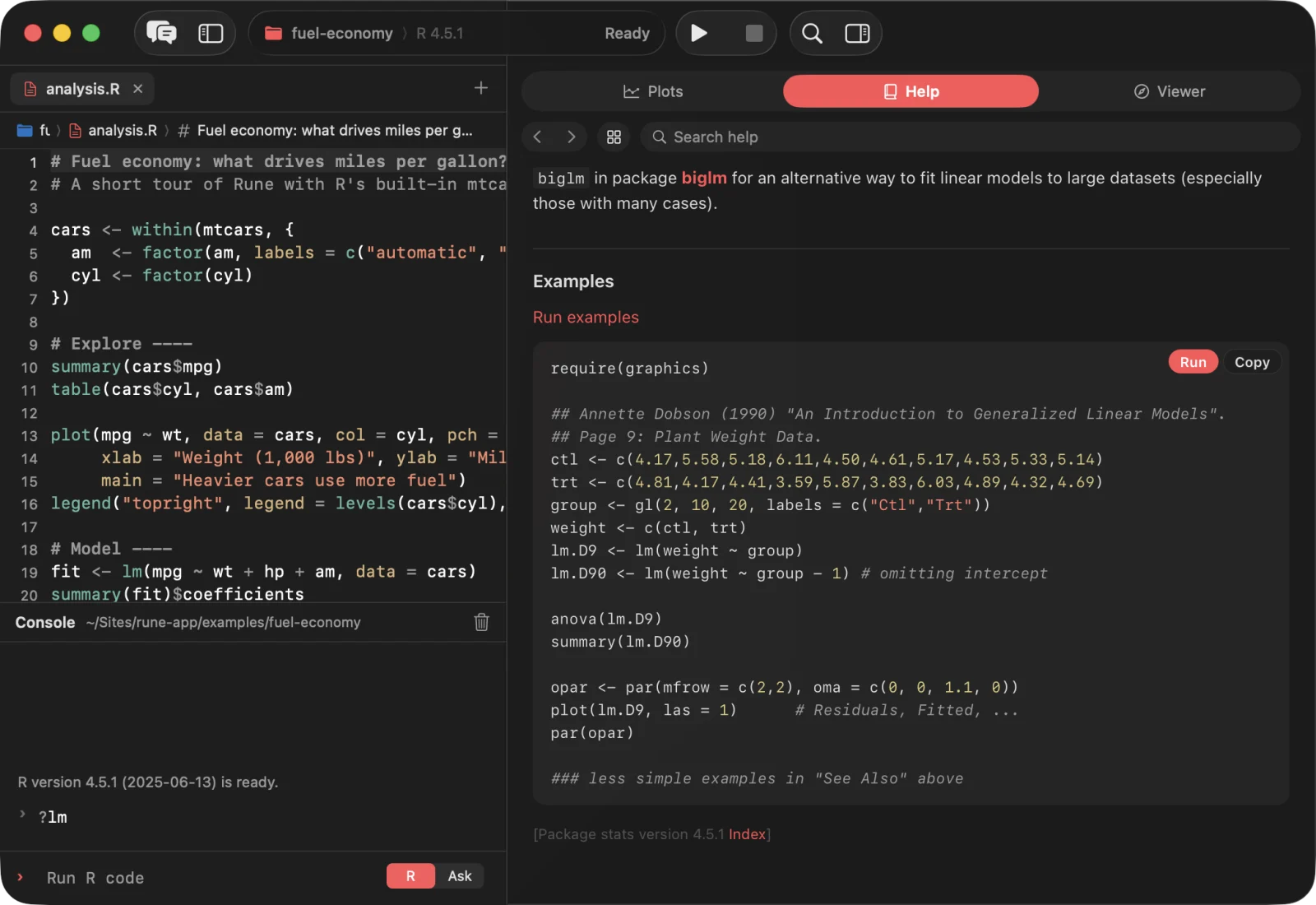
R's help, finally native.
- The whole R documentation in system type and your accent colour, served from your own session.
- Run or copy any example with one click. Hover a name to see what it is in your session.
- Knitted reports, htmlwidgets and Shiny apps open in the viewer next to your code.
- No Pandoc yet? Rune finds the one in RStudio or Quarto, or installs it with Homebrew.
Level 6 · Privacy
Nothing phones home.
Rune has no analytics, no crash reporting, no accounts and no update checks. The app itself contains no code that talks to the internet.
- Your data stays localUnless you use an agent, nothing leaves your Mac except what your own R code sends.
- Agents see what they needWhen you ask, Claude Code sends your message and what the agent reads through Rune's tools to Anthropic.
- Loopback onlyAgent tools listen on 127.0.0.1 with a fresh token per conversation. Nothing listens on your network.
- Names, not codeObject and column names from your data are always quoted, never run as code.
Inventory
Everything in the box.
- EditorR, R Markdown and Quarto; outline, jump bar, breakpoints, inline assist
- ConsoleHistory per project, hover cards, workspace chips, Ask mode
- WorkspaceObjects by kind, columns, filter, lineage map
- Data viewerMillions of rows, sort, filter, copy, column profiles
- PlotsHistory, accent theme, hover, zoom, export
- HelpNative pages, runnable examples, search
- ViewerKnitted reports, htmlwidgets, Shiny, PDF and images
- PackagesInstall from CRAN, update, load, remove
- DebuggerBreakpoints, stack, variables, debug on error
- FindSearch and replace across the project, with regex
- Command palette⌘K for commands, objects, files and help
- SessionsTabs, unsaved work, history and chats come back

The manual
Every pane, every key.
Getting started, a tour of the window, every menu and shortcut, all settings with their defaults, the agents and their tools, and what to do when something gets stuck.
Open the manualQuestions
Before you press start.
Do I need R already?
Yes. Rune runs your installed R 4.x as a separate process: the CRAN installer, Homebrew R or any path you choose in Settings. If R is missing, Rune links you to CRAN.
Does it work with my existing projects?
Open the folder. R starts there, so your .Rprofile and renv load as usual. Tabs, console history and agent conversations are kept per project.
Do I need the agents?
No. Everything except the assistant works without them. To use agents, install the Claude Code CLI (2.1.76 or later) and sign in with your Claude account; Rune finds it on its own.
Can an agent change my data without asking?
Not by default. Code waits for Run, edits wait for Accept, and installs always ask. You can turn on Auto-run for a conversation, and Rune asks you before it does.
Which Macs does it run on?
Macs with Apple silicon on macOS 26. The release build is arm64 only.
Can I knit R Markdown and Quarto?
Yes, with the rmarkdown package and Pandoc, or with Quarto for .qmd. The result opens in the viewer next to your script.

Continue?
Press start.
Rune 1.0 for macOS 26 on Apple silicon.
Download Rune 1.0- R 4.x from CRAN
- For agents: Claude Code 2.1.76 or later
- For knitting: Pandoc or Quarto